
Echo Music
Echo Music is an open-source Android music app built for people who want more control over how they listen to music. It combines music discovery and playback with features such as offline listening, synchronized lyrics, background playback, playlists, podcast support, data-saving tools and a customizable Material You interface.
What makes Echo Music particularly interesting is that it isn’t trying to be another conventional music player. It works as a third-party YouTube Music client, giving users a different way to interact with YouTube Music while adding its own features and interface. The developers make it clear that Echo Music does not host or own the audio content itself.

Note: There are multiple Android applications using the name “Echo Music.” This article refers specifically to the open-source project from EchoMusicApp/Echo-Music, available through the project’s official website and GitHub repository.
What Is Echo Music?
Echo Music is a free, open-source music application for Android that provides an alternative interface for listening to music through YouTube Music.
The project combines a relatively familiar music-player experience with features that many users look for in a modern Android music app, including:
- Offline playback
- Synchronized lyrics
- Background playback
- Ad-free listening
- Smart queues
- Playlist management
- Spotify playlist importing
- Podcast support
- Local media support
- Data Saver Mode
- Listen Together
- Android Auto support
- Theme customization
- Music recognition through Echo Find
The official Echo Music website currently describes the app as a free Android music streaming application with ad-free playback, synced lyrics, offline downloads and a Material You interface.
Why Are People Searching for Echo Music?
A lot of music apps solve only one problem.
Some are good for streaming. Others focus on local files. Some have excellent lyrics, while others offer playlist tools or offline playback.
Echo Music attempts to bring many of those functions together.
For someone who already uses YouTube Music but wants a different Android interface, Echo Music can be an interesting alternative. It also appeals to users who prefer open-source software and want to inspect the project’s source code themselves.
The GitHub repository is public and licensed under GPL-3.0.
Echo Music Features
Offline Music Playback
One of the most useful features in Echo Music is offline playback.
The application supports caching and offline listening, allowing supported music to be played when you don’t have an active internet connection. The official website lists offline playback and downloads as core features.
This can be useful when you’re:
- Travelling
- Using mobile data sparingly
- On a flight
- In an area with weak connectivity
- Listening during a commute
Offline functionality can change between versions, so it’s worth checking the current release before assuming a particular download behavior is available.
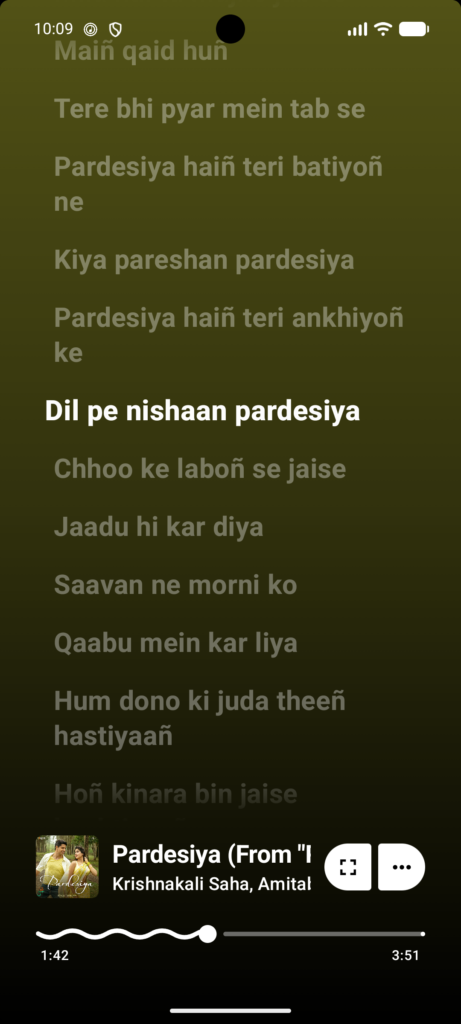
Synchronized Lyrics
Echo Music includes synchronized lyrics that move along with the song.
Rather than opening a separate lyrics website, you can view lyrics directly inside the player while listening.
This is particularly useful for people who enjoy following lyrics while discovering new music.
Ad-Free Playback
Echo Music is designed around an ad-free listening experience.
The official project describes the app as free and ad-free, with no paid subscription tier.
There is an important distinction, however: the GitHub project notes that ads may appear on the manual APK download website to help support development. Those are separate from advertisements during music playback.
Background Playback
Echo Music supports background playback, so music can continue while you use another application or turn off the screen.
That makes it more practical for everyday use rather than requiring the music player to remain permanently visible.
Smart Queue
Echo Music includes a smart queue designed around your listening behavior.
Instead of manually selecting every next song, the application can help build a queue based on your listening activity.
The official website lists Smart Queue among its main features.
Spotify Playlist Import
Already have years of playlists in Spotify?
Echo Music provides playlist-import functionality, allowing users to bring supported Spotify playlists into the application.
The project has also provided migration tools for users moving from an older Echo Music application to the newer version.
Podcast Support
Echo Music isn’t restricted to music.
Podcast support is included in the current feature set, allowing users to keep podcasts and music in the same application.
Local Music
Echo Music can also work with local media stored on your Android device.
This is useful if you have your own collection of MP3s or other supported audio files and don’t want to use a separate application for local playback.
Data Saver Mode
If mobile data usage matters to you, Echo Music includes a Data Saver Mode.
The feature is intended to reduce data consumption during playback, which can be useful on limited mobile plans.
Listen Together
Echo Music also has a Listen Together feature for synchronized listening with friends.
The official site compares the experience to services such as Spotify Jam, making it possible for multiple people to listen together in real time.
Material You Themes
The interface follows modern Android design principles and includes theme customization.
Users can customize the appearance with options such as light and dark themes and other visual settings. The official FAQ also lists theme customization among the newer features.
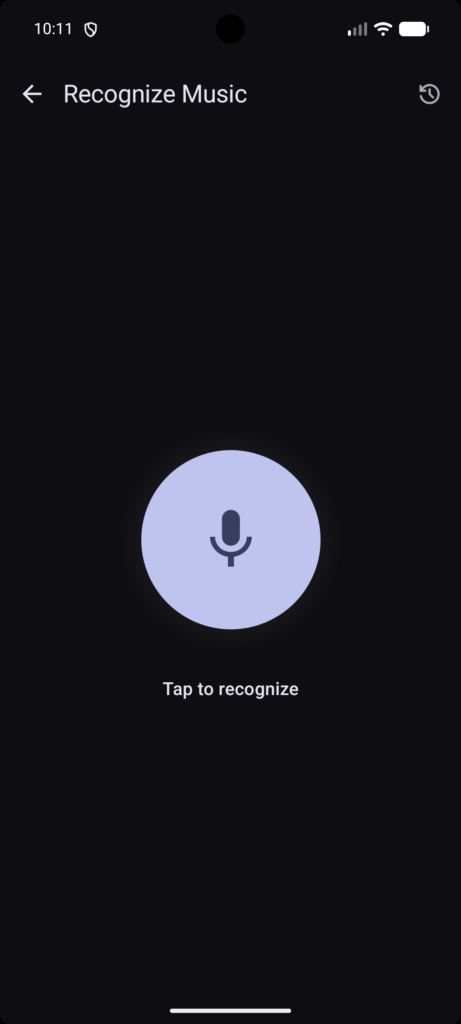
Echo Find
Another interesting feature is Echo Find, the application’s music-recognition functionality.
It is intended to identify music around you, giving Echo Music a feature normally associated with dedicated song-identification applications.
The GitHub repository specifically lists Echo Find among the application’s features.
Android Auto
Echo Music supports Android Auto with an interface designed for in-car use.
The current official feature list describes Android Auto support as part of the application.
Naturally, availability can depend on the Android device, vehicle and current app version.
Echo Music and YouTube Music
This is one of the most important things to understand before installing the application.
Echo Music is not YouTube Music.
It is a third-party client that uses YouTube Music’s music library and provides its own Android interface and additional features.
The developers explicitly state that Echo Music does not host or hold the audio content.
That distinction matters because the behavior of third-party clients can depend on external services.
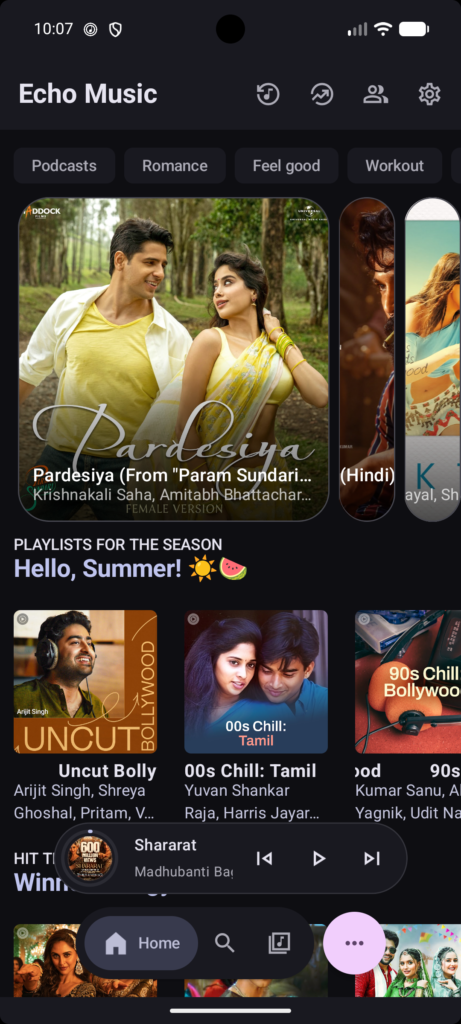
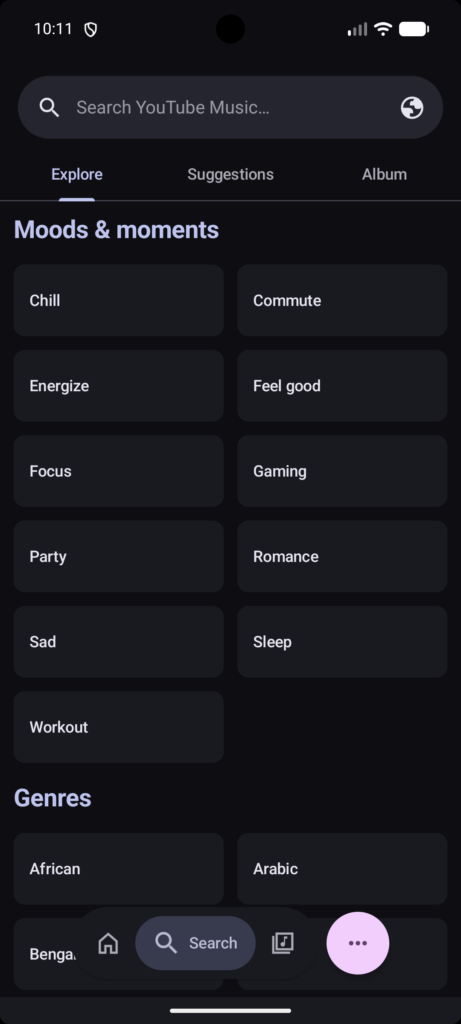
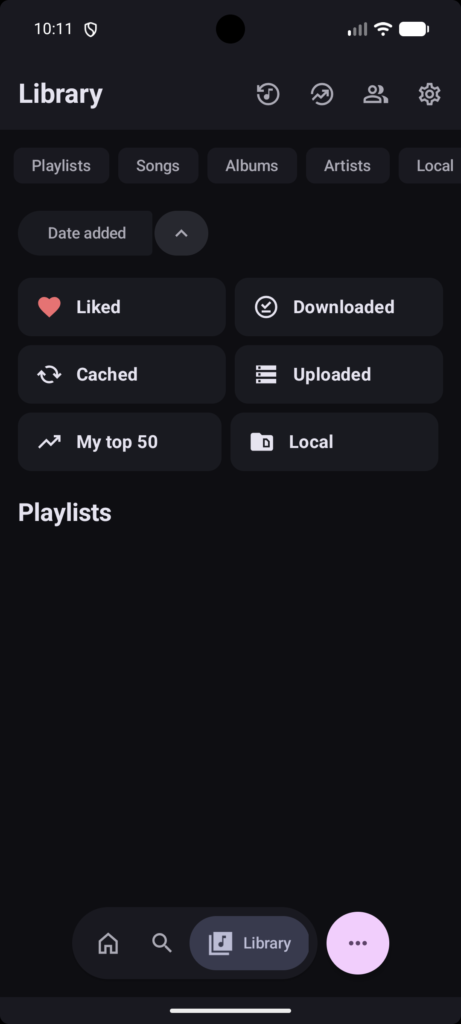
Echo Music App Screenshot

Echo Music APK Download
If you’re searching for Echo Music APK, be careful about where you download it.
There are many APK websites online, and the name “Echo Music” is also used by unrelated applications. The safest approach is to use the project’s official download route.
The official Echo Music website directs users to GitHub Releases for APK distribution.
| App Name | Echo Music |
| Size | 65 MB |
| Cost | Free |
| Latest Version | v1.2.3.1 |
| Update On | 02 SEP 2026 |
Recommended approach:
- Open the official Echo Music website.
- Select the download option.
- Follow the link to the project’s GitHub release.
- Download the current APK.
- Check the release information before installing.
- Install the APK on your Android device.
Avoid modified APKs that promise extra features, premium functionality or “unlocked” versions.
How to Install Echo Music APK
Installing an APK manually is straightforward, although Android may display an additional security warning.
Step 1: Download the APK
Download the latest release from the official Echo Music distribution channel.
Step 2: Open the Downloaded File
Go to your Downloads folder and tap the Echo Music APK.
Step 3: Allow Installation
If Android prevents the installation, it may ask you to allow your browser or file manager to install unknown applications.
Enable the permission only for the application you are using to install the APK.
Step 4: Install
Return to the APK and select Install.
Step 5: Launch Echo Music
Once installation finishes, open the application and configure your preferred settings.
Step 6: Check for Updates
Echo Music’s development schedule has recently changed. Starting September 1, 2026, the project says new releases are expected weekly, generally on Monday or Tuesday IST.
The developers have also permanently removed in-app OTA updates, so users should check the official website for new versions rather than expecting the application to update itself.
Echo Music Android Requirements
The official Echo Music website currently states that the application works on Android 6.0 (Marshmallow) and newer.
Because Android compatibility can change with future releases, check the current release information before installing on an older device.
Is Echo Music Free?
Yes.
The official website describes Echo Music as completely free, with no paid tiers or subscription. It is also open source.
The project’s GitHub repository identifies the software as GPL-3.0 licensed.
Does Echo Music Require an Account?
According to the official website, no account or sign-up is required to use Echo Music.
However, some functionality involving external services or account-based features can behave differently depending on the current version.
Accordion title 1
This is a placeholder tab content. It is important to have the necessary information in the block, but at this stage, it is just a placeholder to help you visualise how the content is displayed. Feel free to edit this with your actual content.
Accordion title 2
This is a placeholder tab content. It is important to have the necessary information in the block, but at this stage, it is just a placeholder to help you visualise how the content is displayed. Feel free to edit this with your actual content.
Is Echo Music Safe?
The best answer is: download it from the official project and verify what you’re installing.
Echo Music’s source code is publicly available on GitHub, which provides a level of transparency that closed-source APK projects don’t offer.
The official website also provides a VirusTotal Scan link, giving users another way to check the distributed APK.
Still, the same rule applies to any Android APK:
Don’t assume an APK from an unrelated website is the same file released by the developer.
For better security:
- Use the official Echo Music website.
- Prefer official GitHub releases.
- Avoid modified APKs.
- Avoid “premium unlocked” versions.
- Check the release version.
- Keep Android security features enabled.
Is Echo Music Legal?
Echo Music is an open-source application, but its relationship with third-party music services means users should understand the distinction between the software and the content it accesses.
The project’s terms state that users are responsible for complying with applicable laws and respecting intellectual-property rights. They also state that users must comply with the terms of third-party platforms such as YouTube Music.
So it would be misleading to make a blanket statement that every use of every Echo Music feature is legally identical in every country.
If you’re concerned about copyright or service terms, check the current terms applicable to the service and your location.
Echo Music vs YouTube Music
| Feature | Echo Music | YouTube Music |
| Android app | Yes | Yes |
| Open source | Yes | No |
| Third-party client | Yes | No |
| Ad-free playback | Yes | Depends on service/subscription |
| Offline playback | Supported | Supported under applicable official plans |
| Synced lyrics | Yes | Yes |
| Spotify playlist import | Yes | Not its main purpose |
| Podcast support | Yes | Yes |
| Theme customization | Extensive | More limited |
| Android Auto | Supported | Supported |
| Official Google app | No | Yes |
The biggest difference isn’t simply the feature list.
It’s the type of application.
YouTube Music is Google’s official service. Echo Music is an independent open-source client that provides a different interface and additional functionality.
Echo Music Pros and Cons
Advantages
Open source:
The code is publicly available, allowing developers and technically minded users to inspect and contribute to the project.
Free:
There is no paid subscription tier according to the official website.
Ad-free playback:
The project is designed without advertising interruptions during music playback.
Offline listening:
Supported music can be cached for offline playback.
Synced lyrics:
Lyrics are integrated directly into the player.
Modern interface:
The Material You design makes the app feel at home on newer Android devices.
Lots of features:
Playlist tools, podcasts, local media, data saving, Listen Together and Android Auto make it considerably more than a basic music player.
Disadvantages
It’s a third-party client:
Echo Music isn’t the official YouTube Music application.
Features can change:
The project is actively developed, and functionality can change from one release to another.
Manual updates:
The developers have removed OTA updates, so users need to obtain new releases manually.
Possible bugs:
Active development inevitably means that users can encounter release-specific problems. The GitHub issue tracker currently contains reports covering crashes, UI problems and feature requests.
Echo Music Troubleshooting
Echo Music Is Not Playing Music
If playback isn’t working:
- Check your internet connection.
- Restart Echo Music.
- Try another song.
- Check whether a new version is available.
- Look at the project’s current GitHub issues.
Because Echo Music depends on external music services, a playback problem isn’t necessarily caused by your Android phone.
Echo Music Keeps Crashing
First, restart the application.
If the problem continues, check whether you’re using the latest release. If the crash appeared after an update, search the project’s GitHub issues for reports from other users.
For example, the current issue tracker includes a report involving an Android 15 device and an equalizer crash in version 1.2.3.
That illustrates why checking current project issues can sometimes be more useful than repeatedly reinstalling the application.
Echo Music Lyrics Are Not Showing
Try:
- Restarting playback
- Checking another song
- Updating Echo Music
- Checking the current project issues
Lyrics depend on available data sources and the current implementation, so behavior can vary.
Echo Music Offline Playback Isn’t Working
Check your:
- Available storage
- Network connection
- Download settings
- App version
- Current project status
If the problem appeared immediately after an update, check the project’s release notes and issue tracker before changing other Android settings.
Echo Music Alternatives
Echo Music isn’t the only open-source music application available for Android.
NewPipe
NewPipe is an open-source Android media application that many users consider when looking for alternatives to official YouTube clients.
RiMusic
RiMusic is another project worth researching if your primary interest is an alternative Android music client.
YouTube Music
If you want official Google support, account synchronization and the standard YouTube Music ecosystem, the official YouTube Music application remains the obvious choice.
Frequently Asked Questions
What is Echo Music?
Echo Music is a free, open-source Android music application and third-party YouTube Music client. It includes features such as offline playback, synced lyrics, ad-free playback, playlists, podcast support and customization.
Is Echo Music free?
Yes. The official website says Echo Music has no paid tiers, subscription or playback advertisements.
Is Echo Music open source?
Yes. Echo Music’s source code is publicly available on GitHub and the project is licensed under GPL-3.0.
Does Echo Music need a Google account?
The official website says no account or sign-up is required.
Can Echo Music play music offline?
Yes. Offline playback and downloads are among the features advertised by the official project.
Does Echo Music have ads?
The application itself is advertised as ad-free. The project’s GitHub repository notes that ads may be displayed on the manual download website to help support development; these are not playback ads inside the application.
Can Echo Music import Spotify playlists?
Yes. Spotify playlist importing is part of the current feature set.
Does Echo Music support lyrics?
Yes. Echo Music supports synchronized lyrics.
Does Echo Music support Android Auto?
Yes. Android Auto is included in the current official feature list.
What Android version does Echo Music require?
The official website currently states Android 6.0 or later.
Where can I download Echo Music APK?
The official website directs users to GitHub Releases for APK downloads. Always verify that you’re downloading the EchoMusicApp/Echo-Music project rather than another Android application using the same name.
Is Echo Music the same as every app called Echo Music?
No. Several unrelated apps use the name Echo Music. Always verify the developer and official project before downloading.
Final Verdict
Echo Music is one of the more feature-rich open-source music clients currently available for Android.
Its appeal isn’t based on a single killer feature. Instead, it’s the combination of offline playback, synchronized lyrics, background listening, playlists, podcast support, local media, customization and other tools in one application.
The project is also moving quickly. The developers announced weekly releases beginning in September 2026 and have continued adding and refining features.
If you’re searching for Echo Music, Echo Music APK, Echo Music Android, or an open-source alternative to the standard YouTube Music experience, the project is worth exploring.